
Blu-ray discs deliver exceptional video and audio quality, making them a favorite among movie enthusiasts and collectors. However, many users eventually encounter a frustrating issue: a Blu-ray disc that refuses to play because it comes from a different region. This problem is caused by blu ray region codes, a system that restricts playback based on geographic location.
If you’ve ever bought a movie abroad or ordered a Blu-ray online only to discover that it doesn’t work on your player, you’re not alone. Understanding how Blu-ray regions work and learning how to bypass these restrictions can help you enjoy your entire collection without limitations.
This guide explains what Blu-ray region codes are, how to identify them, and several reliable ways to play discs from anywhere in the world.
I. Understanding Blu-ray Region Codes
Blu-ray region coding is a digital rights management system used by movie studios and distributors. The goal is to control how and when films are released in different parts of the world.
When a Blu-ray disc is produced, it may be assigned a specific region code. A Blu-ray player sold in a particular region is usually configured to play only discs that match its region.
For example, if a disc is produced for Region B and you try to play it on a Region A player, the device may display a message saying the disc cannot be played due to regional restrictions.
Why Region Codes Exist
Film studios use regional restrictions for several reasons:
- Staggered release schedules: Movies often release at different times across countries.
- Distribution agreements: Different companies may hold rights to distribute the same film in different regions.
- Pricing strategies: Studios may set different prices for various markets.
- Content regulations: Some regions have different censorship or content rules.
While these restrictions make sense from a distribution perspective, they can create inconvenience for international collectors or travelers who purchase Blu-rays abroad.
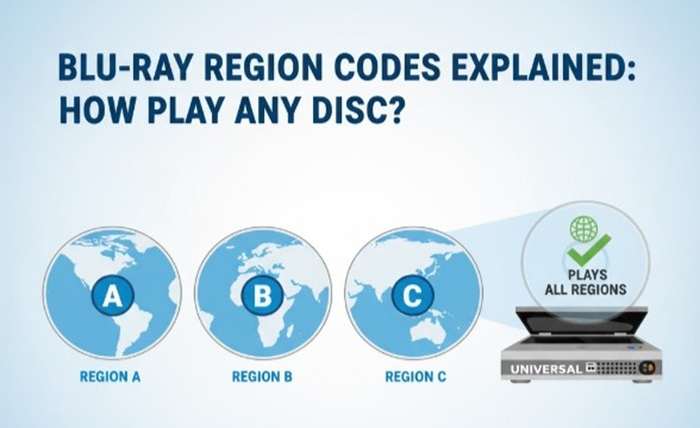
II. Blu-ray Region Code Guide (Regions A, B, and C)
Unlike DVDs, which have more regions, Blu-ray discs typically use three main region codes.
These are commonly referred to as Blu-ray regions A, B, and C.
Below is a simplified overview.
| Region Code | Areas Covered |
| Region A | United States, Canada, Mexico, Japan, South Korea, Taiwan, and parts of Southeast Asia |
| Region B | Europe, the Middle East, Africa, Australia, and New Zealand |
| Region C | China, Russia, India, and other parts of Central and South Asia |
Region-Free Discs
Some Blu-ray discs are labeled ABC or region-free, meaning they can be played anywhere in the world regardless of player region.
These discs are particularly popular among collectors who frequently purchase international releases.
Understanding these regions can help you avoid compatibility issues when buying Blu-ray movies from online retailers or international stores.
III. How to Identify the Region Code of a Blu-ray Disc
Before trying to play a disc, it’s helpful to know which region it belongs to. Fortunately, there are several easy ways to identify the region code.
1. Check the Blu-ray Case
The simplest method is to look at the back of the Blu-ray case. Most discs display a small region symbol.
For example:
- A letter A, B, or C
- A globe icon with the region letter inside
Sometimes you may see multiple letters, such as ABC, which indicates a region-free disc.
2. Look at the Disc Label
In some cases, the disc itself also includes the region symbol printed near the center.
Although not always present, this marking can help confirm compatibility.
3. Check Using Blu-ray Software
If you’re using Blu-ray playback software on a computer, it may detect the region code automatically when the disc is inserted.
Software players often display a message if the disc region doesn’t match the system region.
This can help quickly identify whether a compatibility issue exists.
IV. Ways to Play Blu-rays from Any Region
Fortunately, there are several ways to watch Blu-ray discs from different regions without restrictions. Depending on your setup, you can choose between hardware solutions, software players, or digital backups.
1. Use a Region-Free Blu-ray Player or Playback Software
One of the easiest solutions is to use a region free blu ray player. These players are designed to bypass regional restrictions and play discs from any part of the world.
Many collectors prefer this option because it requires minimal setup. Simply insert the disc and enjoy the movie.
Hardware Options
A best region free blu ray player typically supports:
- Regions A, B, and C
- Multiple disc formats
- High-quality video output
For users who want ultra-high-definition playback, a 4k region free blu ray player can handle both UHD discs and traditional Blu-ray formats without regional limitations.
Software Solution
If you watch movies on a computer, a software player can be an excellent alternative.
One popular option is Leawo Blu-ray Player, which allows users to watch Blu-ray movies directly on their PC or Mac. The software supports various Blu-ray formats and offers high-quality playback without requiring specialized hardware.
Benefits of using playback software include:
- No need to purchase additional hardware
- Support for Blu-ray, DVD, and digital files
- Smooth playback with advanced video decoding
- Convenient controls and subtitles support
For many users, this is one of the easiest ways to watch Blu-ray discs from different regions.
2. Use Blu-ray Copy or Decryption Software
Another method involves copying or decrypting Blu-ray discs to remove region restrictions.
This approach converts the content into a format that can be played anywhere.
Blu-ray copy tools work by reading the disc and creating a duplicate or digital backup that no longer contains regional restrictions.
Advantages of This Method
Using Blu-ray copy software provides several benefits:
Play Content on Any Device
Once the disc is copied or converted, the movie can be played on computers, media players, and other compatible devices.
Create Digital Backups
Blu-ray discs can be scratched or damaged over time. Creating a digital copy ensures your collection remains safe.
Preserve Rare or Imported Discs
Collectors often import limited-edition Blu-ray releases from other countries. Copying these discs helps protect them from wear.
One example tool often used for this purpose is Leawo Blu-ray Copy, which can duplicate Blu-ray discs while preserving the original video quality.
It allows users to:
- Copy Blu-ray discs to another disc
- Save Blu-ray movies to ISO files
- Maintain high-definition quality during duplication
However, this method should only be used with Blu-ray discs that you legally own and for personal use.
3. Buy Region-Free Blu-ray Discs
If you frequently purchase Blu-rays online or collect international titles, choosing region-free discs can eliminate compatibility problems altogether.
Many publishers release discs labeled ABC or All Regions, meaning they can be played anywhere in the world.
Why Collectors Prefer Region-Free Discs
There are several reasons collectors prefer region-free releases:
- No compatibility restrictions
- Easier international purchasing
- Flexibility when upgrading players
- Convenient for travelers or expats
Retailers often specify whether a Blu-ray disc is region-free, so it’s worth checking before making a purchase.
If you’re building a large collection, this approach can save you time and prevent playback issues in the future.
Conclusion
Understanding blu ray region codes is essential for anyone who collects or watches Blu-ray movies. These regional restrictions were designed to help studios control distribution and release schedules, but they can also create obstacles for viewers who buy discs from other parts of the world.
Fortunately, there are several effective solutions.
You can invest in a region free blu ray player, use a 4k region free blu ray player for ultra-high-definition playback, or rely on software like Leawo Blu-ray Player to watch Blu-rays directly on your computer. Another option is copying your discs using Blu-ray duplication tools to remove regional restrictions and create digital backups.
Additionally, purchasing region-free Blu-ray discs is a simple way to avoid compatibility issues altogether.
By understanding Blu-ray regions and using the right tools, you can enjoy movies from anywhere in the world without worrying about playback limitations.